

09 Jan Deploy Box Tools at Scale: Automating a User-Interactive DMG Installer in Jamf Pro

Overview
Box Tools for Mac is what enables the “open/edit in a desktop app” workflow from the Box website: when you click Open or choose an Edit option in Box, it launches the file in the default app on your Mac (for example, Word for .docx, Excel for .xlsx, PowerPoint for .pptx, Photoshop for .psd, and many other formats), and when you save in that desktop app, the updated file is saved back to Box so the web copy stays current. It’s designed to work with many file types beyond Office (including things like images and CAD files) and is intended to work across the browsers and platforms Box supports.
For collaboration, Box recommends locking a file before editing with Box Edit if you want to prevent others from changing it while you work; otherwise, if two people edit at the same time, you can run into version conflicts (Box will notify you, and conflicts may result in separate copies/versions rather than merging changes). Behind the scenes, Box Edit uses a local working copy on your Mac (Box’s FAQ notes it stores files under ~/Library/Application Support/Box/Box Edit/Documents/), and best practice is to save and close after each editing session, then re-open from Box for the next session.
Background
Box Tools is distributed as a disk image (.dmg) and does not use a standard Apple pkg installer. Instead, the DMG contains a custom installer application that must be launched to complete setup.
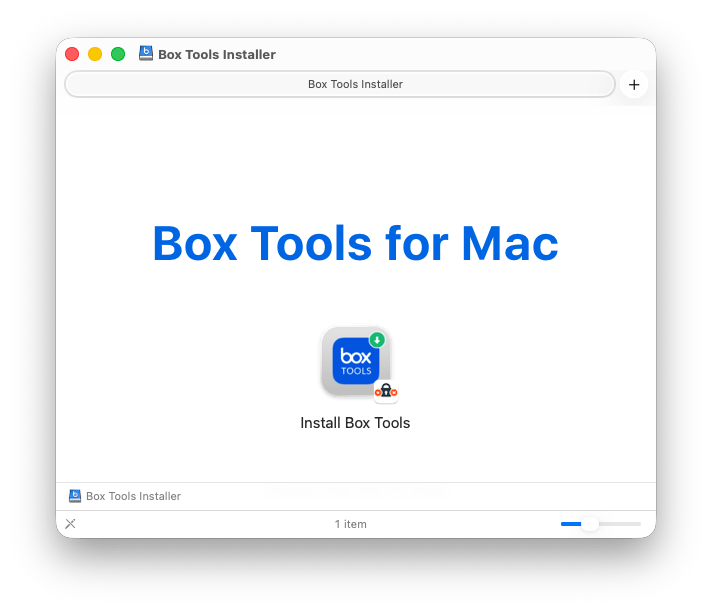
Because Box Tools is delivered as a DMG containing a custom installer app rather than a standard Apple-signed .pkg it increases the operational overhead for MacAdmins who need to deploy and support it at scale. Nonstandard installers are harder to automate reliably in MDM workflows, often require an active logged-in user session and UI interaction, and can complicate compliance reporting, error handling, and troubleshooting—especially compared to a conventional package that supports silent installation, predictable receipts, and straightforward inventory validation. Organizations deploying Box Tools broadly should consider opening a support case with Box Technical Support (and referencing your enterprise deployment requirements) to request a standard Apple Installer package..pkg) option, which would reduce deployment complexity and improve consistency across managed macOS environments.
To submit a request to Box Technical Support, see the webpage: https://support.box.com/hc/en-us/requests/new
What gets installed
Box Tools installs per-user components (not system-wide). The installer removes older Box Tools components that may cause conflicts, then creates ~/Library/Application Support/Box/Box Edit/ and places the helper apps Box Edit.app and Box Local Com Server.app in that directory. The installer launches both apps to confirm they are running, and they register to start automatically at login for that user.
Requires end-user action
This installation runs in the logged-in user context and is interactive. After clicking Install in Self Service, the Box Tools Installer window will appear. The user must click Continue → Install → OK (and enter their Mac password if prompted) to complete the installation.
Verification
After installation, users can confirm it’s working by opening a file from Box in a desktop app, saving changes, and verifying the updated “Modified” time (or version history) in Box. IT staff can also confirm that the helper applications exist under ~/Library/Application Support/Box/Box Edit/ and are running for the user session.
Box Tools Installer Script
Initially, I believed this project would be relatively straightforward, allowing our staff users to install Box Tools using our Jamf Pro Self Service application. However, as I delved deeper into the project, it proved to be more intricate than anticipated.

This script automates Box Tools installation on macOS via Jamf Pro Self Service while still requiring a user-interactive installer run. It begins by confirming it is running as root and identifying the active console (GUI) user, excluding system/setup accounts (e.g., _mbsetupuser). It then downloads the Box Tools DMG from the Box CDN with robust safeguards, including three retry attempts (5-second delays), HTTP status validation (200/403/404/500s/000), and a file-size check to confirm a complete download. Next, it mounts the DMG hidden using -nobrowse and copies the installer application bundle to /tmp/box_tools to avoid “quit unexpectedly” behavior sometimes seen when launching installers directly from a mounted disk image. The installer is launched as the console user (not root) and must be completed by the user; Box Tools handles its own internal cleanup and setup by removing older components, creating ~/Library/Application Support/Box/Box Edit/, installing Box Edit.app and Box Local Com Server.app, launching them, and registering them to start at login. To ensure the user sees the installer prompts, the script brings the installer window to the foreground using AppleScript, monitors the installer process every second, and enforces a 5-minute timeout to prevent hangs. After the installer exits, the script verifies expected per-user artifacts in the user’s Library path, then cleans up by unmounting the DMG and removing /tmp/box_tools. Exit codes are: 0 success, 1 not root or no console user, 2 download failed after retries, 3 mount failure, 4 installer app not found, and 5 install failed or timed out.
Script Flow
- Start / Preconditions
- Confirm script is running as root
- Identify the logged-in console (GUI) user
- Exit if no eligible console user is logged in (or if only setup/system users are present)
- Download Box Tools DMG
- Create working directory (e.g.,
/tmp/box_tools) - Download Box Tools DMG from Box CDN
- Validate download:
- Retry up to 3 times with 5-second delays
- Validate HTTP status (success/failure conditions)
- Confirm the DMG file size is greater than zero
- Create working directory (e.g.,
- Mount DMG (Hidden)
- Mount DMG using
-nobrowseto keep it hidden from Finder/Desktop - If already mounted, unmount first to avoid conflicts
- Confirm the mount point is available (e.g.,
/Volumes/Box Tools Installer)
- Mount DMG using
- Locate Installer App
- Find the installer application bundle inside the mounted DMG:
Install Box Tools.app
- Exit if the installer app cannot be found
- Find the installer application bundle inside the mounted DMG:
- Stage Installer Locally
- Copy
Install Box Tools.appfrom the mounted DMG to:/tmp/box_tools
- Purpose: avoid installer crashes or unexpected quits when launched directly from DMG
- Copy
- Launch Installer (User-Interactive)
- Launch the installer as the console user (not root)
- Bring the installer window to the foreground using AppleScript activate
- Monitor the installer process:
- Check every 1 second for exit
- Log progress periodically
- Enforce a 5-minute timeout (terminate if abandoned/hung)
- Verify Installation
- Confirm expected per-user artifacts exist (per Box behavior), including:
~/Library/Application Support/Box/Box Edit/Box Edit.appBox Local Com Server.app
- Log success or a warning if expected items are missing
- Confirm expected per-user artifacts exist (per Box behavior), including:
- Cleanup
- Unmount DMG
- Remove temporary working directory (e.g.,
/tmp/box_tools) - Cleanup runs even if earlier steps fail
Exit codes
- 0 — Success
- 1 — Not running as root or no console user logged in
- 2 — Download failed after all retry attempts
- 3 — Failed to mount DMG
- 4 — Could not locate installer application
- 5 — Installer failed or timed out
Logs
To review or troubleshoot, you can view the Jamf Pro policy logs, the Box Tools Installer script local logs, or Jamf Pro local logs.
Jamf Pro Policy Logs

Box Tools Installer Script Local Logs
Logs located at: /tmp/box_tools_install.log

Jamf Pro Local Logs
Or Jamf Pro’s local log:/var/log/jamf.log
You use grep for your timestamps or “Box Tools Installer.
Box Tools Installation Script
#!/usr/bin/env bash
#
# Box Tools Installer for macOS
#
# This script downloads and installs Box Tools for Mac
# using the latest available DMG from Box.
#
# Designed for deployment via Jamf Pro
#
# Version: 1.0.0
# Date: 2026.01.09
#
# SCRIPT FLOW:
# 1. Verify root privileges and detect console user
# 2. Download Box Tools DMG from Box CDN
#    - Retry logic: 3 attempts with 5-second delays
#    - HTTP status code validation (200/403/404/500s)
#    - File size verification
# 3. Mount DMG invisibly (hidden from Finder with -nobrowse)
# 4. Find installer application (.app bundle) in mounted volume
# 5. Copy installer from DMG to /tmp/box_tools
#    - Prevents "quit unexpectedly" crashes from DMG access
# 6. Launch installer as console user
#    - User-interactive installation (not silent/automated)
#    - Installer performs automatic uninstall of outdated versions
#    - Creates ~/Library/Application Support/Box/Box Edit/
#    - Installs Box Edit.app and Box Local Com Server.app
#    - Launches both apps and registers them for login startup
#    - Force to foreground with AppleScript activate
#    - Monitor process every 1 second for immediate exit detection
#    - 5-minute timeout with forced termination
# 7. Verify installation in user's Library folder
#    - ~/Library/Application Support/Box/Box Edit/Box Edit.app
#    - ~/Library/Application Support/Box/Box Edit/Box Local Com Server.app
# 8. Cleanup: Unmount DMG and remove temporary files
#
# EXIT CODES:
#   0 - Success
#   1 - Not running as root or no console user
#   2 - Download failed after all retry attempts
#   3 - Failed to mount DMG
#   4 - Could not locate installer application
#   5 - Installation failed or timed out
#
# Copyright (c) 2026 University of Utah, Marriott Library ITS
# All Rights Reserved.
#
# Permission to use, copy, modify, and distribute this software and
# its documentation for any purpose and without fee is hereby granted,
# provided that the above copyright notice appears in all copies and
# that both that copyright notice and this permission notice appear
# in supporting documentation, and that the name of The University
# of Utah not be used in advertising or publicity pertaining to
# distribution of the software without specific, written prior
# permission. This software is supplied as is without expressed or
# implied warranties of any kind.

set -euo pipefail

SCRIPT_VERSION="1.0.0"
SCRIPT_NAME=$(basename "$0")

# Configuration
BOX_TOOLS_URL="https://e3.boxcdn.net/box-installers/boxedit/mac/currentrelease/BoxToolsInstaller.dmg"
DOWNLOAD_DIR="/tmp/box_tools"
DMG_NAME="BoxToolsInstaller.dmg"
DMG_PATH="${DOWNLOAD_DIR}/${DMG_NAME}"
MOUNT_POINT="/Volumes/Box Tools Installer"
MAX_DOWNLOAD_ATTEMPTS=3
RETRY_DELAY=5
LOG_FILE="/tmp/box_tools_install.log"

# Logging
log() {
    local level="$1"; shift
    local message="$*"
    local timestamp
    timestamp="$(date '+%Y-%m-%d %H:%M:%S')"
    local log_line="${timestamp} [${level}] ${message}"

    # Write to stderr for Jamf Pro
    echo "$log_line" >&2

    # Write to local log file (append mode)
    echo "$log_line" >> "$LOG_FILE" 2>/dev/null || true
}

# Ensure running as root
ensure_root() {
    if [[ $EUID -ne 0 ]]; then
        log "ERROR" "This script must be run as root"
        exit 1
    fi
}

# Detect current console user
detect_console_user() {
    local user
    user=$(/usr/bin/stat -f '%Su' /dev/console 2>/dev/null || true)

    if [[ -z "$user" || "$user" == "root" || "$user" == "_mbsetupuser" ]]; then
        user=$(scutil <<<"show State:/Users/ConsoleUser" | awk '/Name :/ && !/loginwindow/ { print $3 }')
    fi

    if [[ "$user" == "root" || "$user" == "_mbsetupuser" ]]; then
        user=""
    fi

    echo "$user"
}

# Download DMG with retry logic
download_box_tools() {
    log "INFO" "Creating download directory: $DOWNLOAD_DIR"
    mkdir -p "$DOWNLOAD_DIR"

    if [[ -f "$DMG_PATH" ]]; then
        log "INFO" "Removing existing DMG file"
        rm -f "$DMG_PATH"
    fi

    local attempt=1

    while (( attempt <= MAX_DOWNLOAD_ATTEMPTS )); do
        log "INFO" "Downloading Box Tools (attempt $attempt/$MAX_DOWNLOAD_ATTEMPTS)"
        log "INFO" "URL: $BOX_TOOLS_URL"

        # First, check HTTP status code
        local http_code
        http_code=$(curl -L -s -o /dev/null -w "%{http_code}" "$BOX_TOOLS_URL" --max-time 30)

        log "INFO" "HTTP status code: $http_code"

        # Check status code
        case "$http_code" in
            200)
                log "INFO" "URL is accessible, proceeding with download"
                ;;
            000)
                log "ERROR" "Connection failed - network timeout or DNS failure"
                ;;
            403)
                log "ERROR" "Access forbidden (403) - authentication or permission issue"
                ;;
            404)
                log "ERROR" "File not found (404) - URL may be incorrect or file moved"
                ;;
            500|502|503|504)
                log "ERROR" "Server error ($http_code) - Box CDN may be experiencing issues"
                ;;
            *)
                log "ERROR" "Unexpected HTTP status code: $http_code"
                ;;
        esac

        # Only attempt download if we got 200
        if [[ "$http_code" == "200" ]]; then
            if curl -L -o "$DMG_PATH" "$BOX_TOOLS_URL" --fail --silent --show-error --max-time 300; then
                # Verify file was downloaded and is not empty
                if [[ -f "$DMG_PATH" && -s "$DMG_PATH" ]]; then
                    local file_size
                    file_size=$(stat -f%z "$DMG_PATH" 2>/dev/null || echo 0)
                    log "INFO" "Download completed successfully (${file_size} bytes)"
                    return 0
                else
                    log "ERROR" "Downloaded file is empty or missing"
                fi
            else
                log "ERROR" "Download failed on attempt $attempt"
            fi
        else
            log "ERROR" "Cannot download - HTTP status $http_code indicates URL is not accessible"
        fi

        # If we're not on the last attempt, wait before retrying
        if (( attempt < MAX_DOWNLOAD_ATTEMPTS )); then
            log "INFO" "Waiting ${RETRY_DELAY} seconds before retry..."
            sleep "$RETRY_DELAY"
        fi

        ((attempt++))
    done

    log "ERROR" "Failed to download Box Tools installer after $MAX_DOWNLOAD_ATTEMPTS attempts"
    return 1
}

# Mount DMG invisibly
mount_dmg() {
    log "INFO" "Mounting DMG (hidden from Finder)"

    # Check if already mounted
    if [[ -d "$MOUNT_POINT" ]]; then
        log "WARN" "Volume already mounted at: $MOUNT_POINT"
        log "INFO" "Unmounting existing volume"
        hdiutil detach "$MOUNT_POINT" -force 2>/dev/null || true
        sleep 2
    fi

    # Mount with nobrowse flag to hide from Finder
    if hdiutil attach "$DMG_PATH" -nobrowse -quiet; then
        log "INFO" "DMG mounted successfully at: $MOUNT_POINT"
        return 0
    else
        log "ERROR" "Failed to mount DMG"
        return 1
    fi
}

# Find installer app
find_installer() {
    local app_path

    # Look for .app bundle
    app_path=$(find "$MOUNT_POINT" -maxdepth 2 -name "*.app" -type d 2>/dev/null | head -1)

    if [[ -z "$app_path" ]]; then
        log "ERROR" "Could not find installer application in mounted volume"
        log "INFO" "Contents of $MOUNT_POINT:"
        ls -la "$MOUNT_POINT" 2>&1 | while read -r line; do log "INFO" "  $line"; done
        return 1
    fi

    log "INFO" "Found installer app at: $app_path"

    # Copy the installer to the download directory to avoid DMG access issues
    local temp_app_path="${DOWNLOAD_DIR}/$(basename "$app_path")"

    log "INFO" "Copying installer to temporary location: $temp_app_path"
    if [[ -d "$temp_app_path" ]]; then
        rm -rf "$temp_app_path"
    fi

    if cp -R "$app_path" "$temp_app_path"; then
        log "INFO" "Installer copied successfully"
        echo "$temp_app_path"
    else
        log "ERROR" "Failed to copy installer to temporary location"
        return 1
    fi
}

# Run installer and bring to foreground
run_installer() {
    local installer_path="$1"
    local current_user="$2"
    local timeout_seconds=300  # 5 minutes max

    log "INFO" "Launching Box Tools installer"
    log "INFO" "Installer: $installer_path"
    log "INFO" "User will need to click through the installer prompts"
    log "INFO" "Script will continue once installer closes"

    # Launch the installer as the current user in background
    sudo -u "$current_user" open -W "$installer_path" &
    local open_pid=$!

    # Wait a moment for the app to launch
    sleep 3

    # Force the installer to the foreground using AppleScript activate
    log "INFO" "Bringing installer to foreground"
    sudo -u "$current_user" osascript <<-'EOF' 2>&1 | while read -r line; do log "INFO" "  $line"; done
        try
            tell application "Install Box Tools"
                activate
            end tell
            return "Activated successfully"
        on error errMsg
            return "Activation error: " & errMsg
        end try
EOF

    # Monitor the installer process - check every second for quick response
    local elapsed=0
    log "INFO" "Monitoring installer process..."
    while kill -0 "$open_pid" 2>/dev/null; do
        if (( elapsed >= timeout_seconds )); then
            log "WARN" "Installer timed out after ${timeout_seconds} seconds"
            log "WARN" "Terminating installer process"
            kill "$open_pid" 2>/dev/null || true
            # Also kill the actual installer app if still running
            pkill -9 "Install Box Tools" 2>/dev/null || true
            return 1
        fi
        sleep 1
        elapsed=$((elapsed + 1))

        # Log progress every 30 seconds
        if (( elapsed % 30 == 0 )); then
            log "INFO" "Installer still running... (${elapsed}s elapsed)"
        fi
    done

    # Check if process completed successfully
    wait "$open_pid" 2>/dev/null
    local exit_code=$?

    if [[ $exit_code -eq 0 ]]; then
        log "INFO" "Installer closed - installation process completed"
        return 0
    else
        log "ERROR" "Installer exited with code: $exit_code"
        return 1
    fi
}

# Verify installation
verify_installation() {
    local current_user="$1"
    log "INFO" "Verifying installation..."
    sleep 3

    # Get user's home directory
    local user_home
    user_home=$(eval echo "~${current_user}")

    # Check Box Tools installation locations per official documentation
    # Box Tools installs to: ~/Library/Application Support/Box/Box Edit/
    local box_tools_locations=(
        "${user_home}/Library/Application Support/Box/Box Edit/Box Edit.app"
        "${user_home}/Library/Application Support/Box/Box Edit/Box Local Com Server.app"
        "${user_home}/Library/Application Support/Box/Box Edit"
    )

    local found=false
    for location in "${box_tools_locations[@]}"; do
        if [[ -e "$location" ]]; then
            log "INFO" "Box Tools found at: $location"
            found=true
        fi
    done

    if [[ "$found" == "true" ]]; then
        log "INFO" "Installation verification successful"
        return 0
    else
        log "WARN" "Could not verify Box Tools installation in expected locations"
        log "WARN" "Installation may have succeeded but files are in a non-standard location"
        return 1
    fi
}

# Cleanup
cleanup() {
    log "INFO" "Cleaning up"

    # Unmount DMG
    if [[ -d "$MOUNT_POINT" ]]; then
        log "INFO" "Unmounting DMG"
        hdiutil detach "$MOUNT_POINT" -quiet -force 2>/dev/null || true
        sleep 2
    fi

    # Remove download directory (includes installer copy and DMG)
    if [[ -d "$DOWNLOAD_DIR" ]]; then
        log "INFO" "Removing download directory"
        rm -rf "$DOWNLOAD_DIR"
    fi

    log "INFO" "Cleanup completed"
}

# Main
main() {
    log "INFO" "Box Tools Installer v${SCRIPT_VERSION} starting"

    # Ensure running as root
    ensure_root

    # Detect console user
    local current_user
    current_user=$(detect_console_user)

    if [[ -z "$current_user" ]]; then
        log "ERROR" "No console user logged in - installation requires a GUI user"
        exit 1
    fi

    log "INFO" "Console user: $current_user"

    # Download DMG
    if ! download_box_tools; then
        log "ERROR" "Download failed"
        cleanup
        exit 2
    fi

    # Mount DMG
    if ! mount_dmg; then
        log "ERROR" "Failed to mount installer DMG"
        cleanup
        exit 3
    fi

    # Find installer
    local installer_path
    if ! installer_path=$(find_installer); then
        log "ERROR" "Could not locate installer application"
        cleanup
        exit 4
    fi

    # Run installer
    if ! run_installer "$installer_path" "$current_user"; then
        log "ERROR" "Failed to install Box Tools"
        cleanup
        exit 5
    fi

    log "INFO" "Box Tools installation process completed"

    # Verify installation
    if verify_installation "$current_user"; then
        log "INFO" "Box Tools installation completed successfully"
    else
        log "WARN" "Installation verification did not confirm successful installation"
    fi

    # Cleanup
    log "INFO" "Performing cleanup"
    cleanup

    log "INFO" "Box Tools installation script completed"
    exit 0
}

# Run main function
main "$@"
User Experience
To install Box Tools, open Jamf Pro Self Service, search for Box Tools, and click Install. The policy will run a script that downloads and prepares the Box Tools installer (this can take a moment). The Install Box Tools window will then open; if it appears behind Self Service, the script will bring it to the foreground.
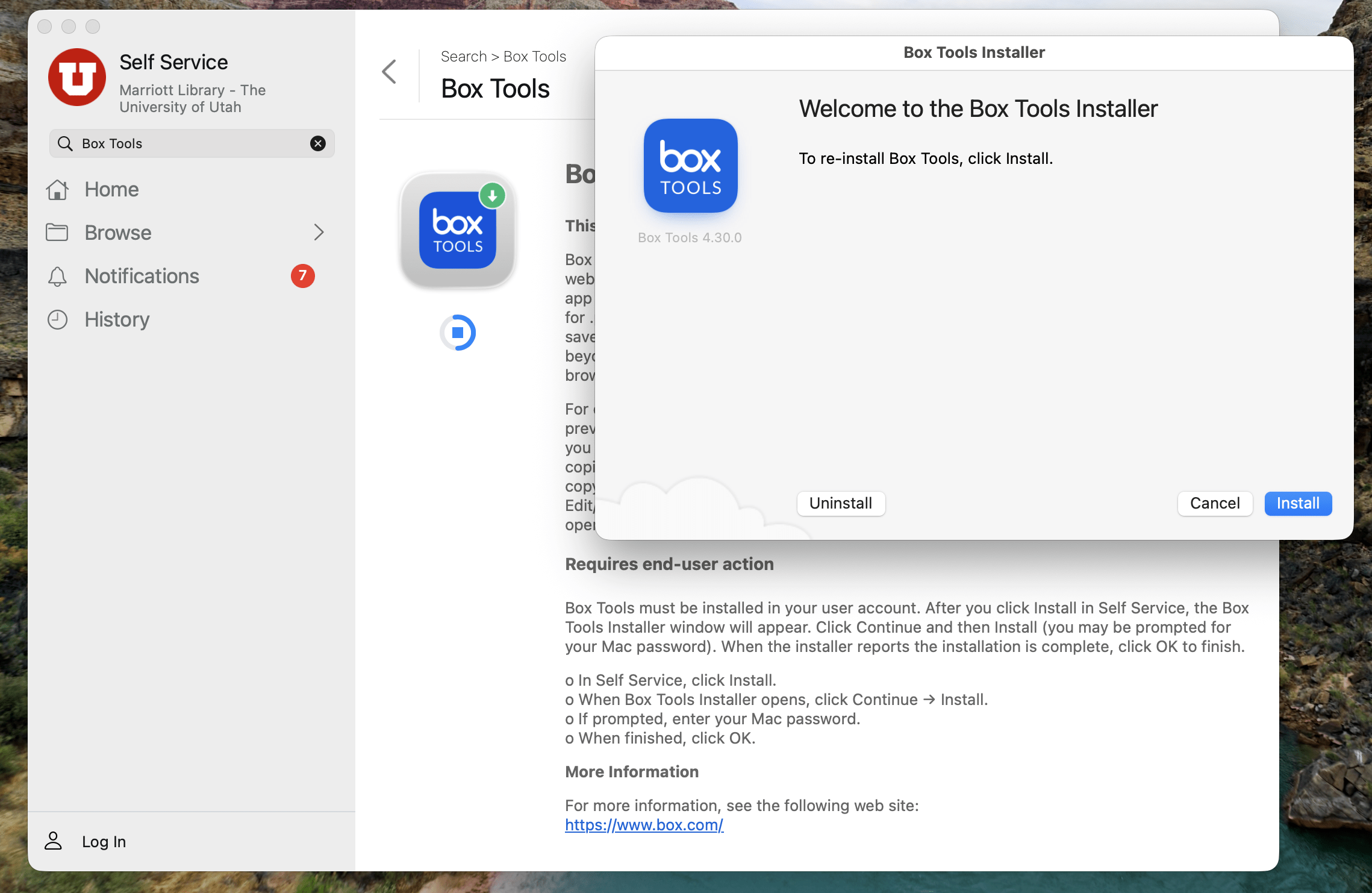
User Clicks Continue & Install
Next, the user clicks Continue and then Install.
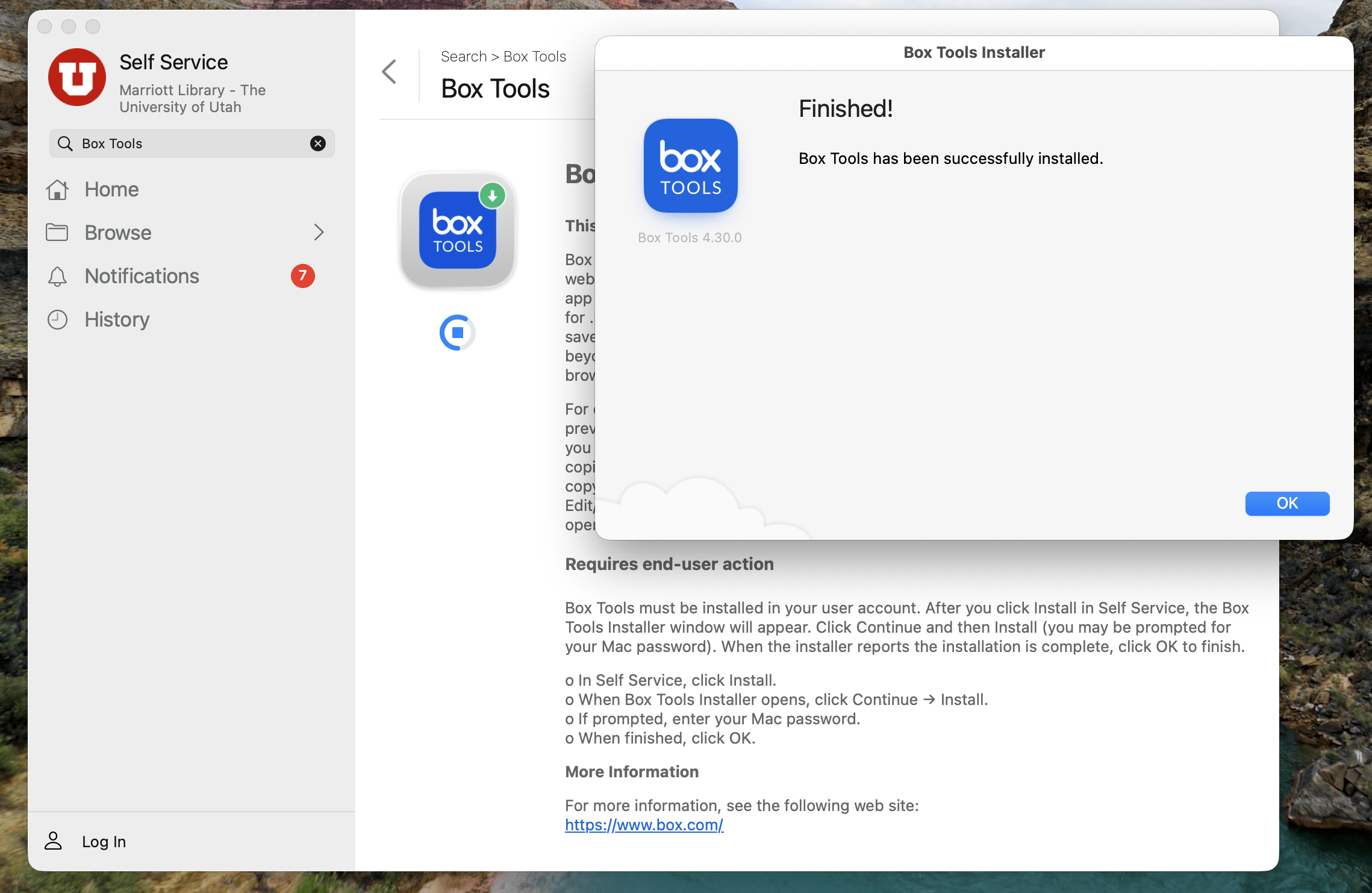
User clicks OK when the Installation is completed
When the installer reports completion, they click OK; once the installer closes, the policy finishes.

If the installer is left open or abandoned, the process will time out after several minutes—simply run the Self Service install again.
User Testing
Here are the simplest ways a user can confirm that Box Tools has been installed successfully and is working:
Test the core workflow
- Open a browser and sign in to Box.
- Open any Office file (Word/Excel/PowerPoint) you can edit.
- Use Open / Open in Desktop App (or similar menu option).
- The file should open in the local desktop app (Word/Excel/etc).
- Make a small change, Save, then close the app.
- Back in Box, confirm the file’s Modified time updated (and/or a new version appears in Version History).
If the file doesn’t open in the desktop app, the most common causes are: Box Tools not installed for that user account, the browser blocking the handoff, or the user lacking edit permissions on the file.
Links & Resources
- Allow Box domains local network access in Chrome, Edge and Firefox to avoid Box Tools disruption
https://support.box.com/hc/en-us/articles/45163820905107-Allow-Box-domains-local-network-access-in-Chrome-Edge-and-Firefox-to-avoid-Box-Tools-disruption - Installing Box Tools
https://support.box.com/hc/en-us/articles/360043697334-Installing-Box-Tools - Large Scale Deployments: Box Tools
https://support.box.com/hc/en-us/articles/360043695834-Large-Scale-Deployments-Box-Tools - Opening and Editing Files with Box Tools
https://support.box.com/hc/en-us/articles/360043696694-Opening-and-Editing-Files-with-Box-Tools - Uninstall Box Tools
https://support.box.com/hc/en-us/articles/360043696134-Uninstall-Box-Tools - Understanding System Requirements to Use Box Tools v4
https://support.box.com/hc/en-us/articles/360043697634-Understanding-System-Requirements-to-Use-Box-Tools-v4
Jehan Aziz
Posted at 15:09h, 14 JanuaryThere is an admin .pkg version of the Box Tools installer at https://box-installers.s3.amazonaws.com/boxedit/mac/currentrelease/BoxToolsInstaller.pkg
u0105821
Posted at 14:05h, 16 JanuaryHi Jehan:
Thanks for flagging that a macOS installer package exists. We’ve already migrated to it, and initial installs and future upgrades will be handled by the open-source tool Installomator (https://github.com/Installomator/Installomator). While that makes the specific Box Tools steps in the article mostly obsolete, the approach for creating similar scripts remains useful for software that doesn’t provide an installer package.